Managing dozens of online accounts has become a normal part of modern digital life. Unfortunately, human memory and habits are not well suited for creating and remembering strong, unique passwords for every service.
Password managers address this problem by providing a secure way to generate, store, and manage credentials, significantly improving online security while reducing human error.
What Is a Password Manager?
A password manager is a security tool that stores login credentials in an encrypted digital vault. Users access this vault with a single master password or biometric authentication.
Why Password Security Is a Growing Problem
Weak, reused, or predictable passwords remain one of the leading causes of account breaches worldwide.
Common Password-Related Risks
- Password reuse across multiple sites
- Simple or guessable passwords
- Phishing attacks
- Data breaches exposing credentials
How Password Managers Work
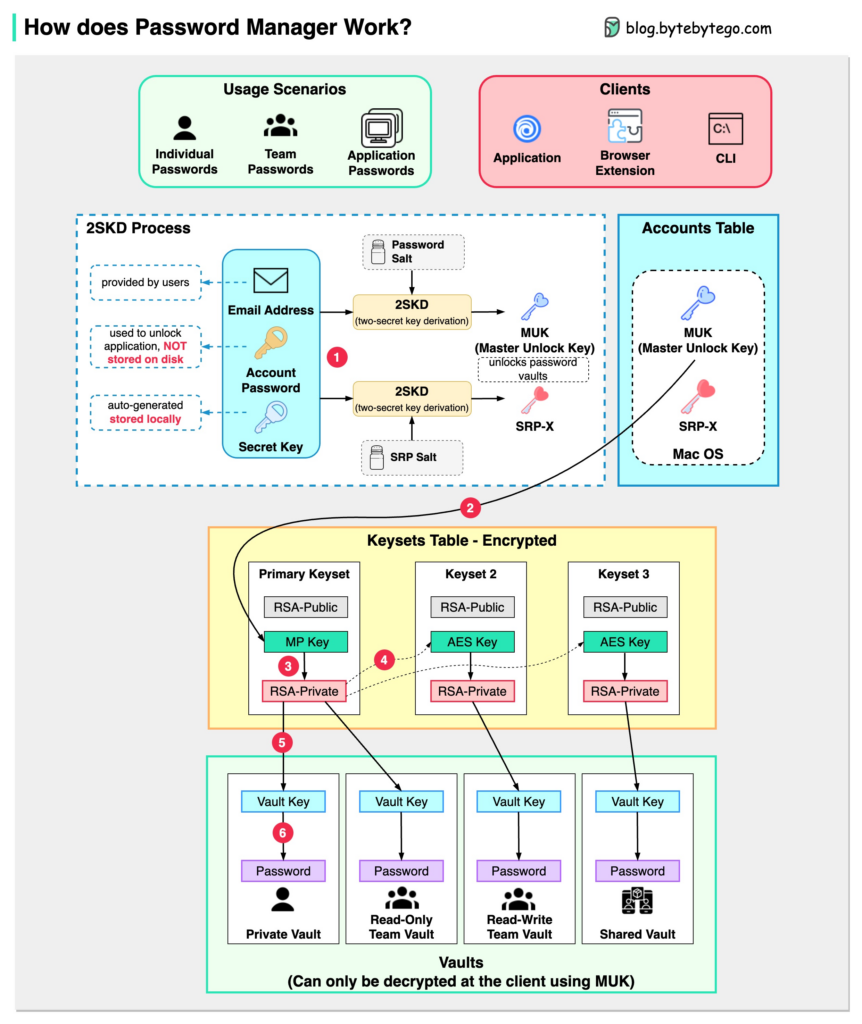
Credential Generation
Password managers create strong, random passwords that are difficult to crack.
Encrypted Storage
All credentials are stored using strong encryption algorithms.
Secure Autofill
Passwords are automatically filled into legitimate websites and apps.
Authentication Protection
Access to the vault is protected by master passwords, biometrics, or two-factor authentication.
Password Managers vs Browser-Saved Passwords
| Password Managers | Browser Storage |
|---|---|
| End-to-end encryption | Limited encryption |
| Cross-platform support | Browser-specific |
| Advanced security features | Basic storage only |
How Password Managers Reduce Human Error
Eliminating Password Reuse
Unique passwords are generated for every account.
Reducing Phishing Risk
Autofill works only on legitimate domains.
Preventing Weak Password Choices
Users no longer rely on memory-friendly passwords.
Password Managers for Individuals
Personal users benefit from simplified security without sacrificing convenience.
Password Managers for Businesses
Organizations use password managers to enforce strong credential policies.
Password Managers and Two-Factor Authentication
Password managers complement 2FA by protecting the primary authentication factor.
Security Concerns and Misconceptions
Some users worry about storing all passwords in one place, but modern encryption significantly reduces this risk.
What Happens If the Master Password Is Lost?
Most password managers implement recovery options without accessing user data.
Password Managers and Privacy
Reputable password managers use zero-knowledge architectures, meaning providers cannot read stored data.
Common Mistakes When Using Password Managers
- Using a weak master password
- Disabling two-factor authentication
- Ignoring security alerts
Choosing the Right Password Manager
Important factors include encryption standards, usability, device support, and transparency.
Future of Password Management
Passwordless authentication and biometric security are evolving alongside password managers.
Common Myths About Password Managers
- Password managers are single points of failure
- They are too complex for everyday users
- Only businesses need password managers
Final Thoughts
Password managers are one of the most effective tools for improving online security. By reducing reliance on human memory and habits, they help protect accounts from common attack methods.
In a digital world filled with threats, password managers offer a practical balance between security and convenience.